


Invoice Maker Tofu & Receipts
4.699.00 Reviews
App Specs
- Version
- 1.2.15
- Updated On
- License
- Free
- Downloads
- 1,000,000+
- Developer
- GetPaid Inc.
- Categories
- Business
- Platform
- Android
Screenshots
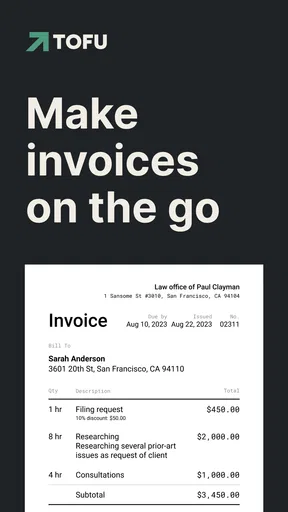
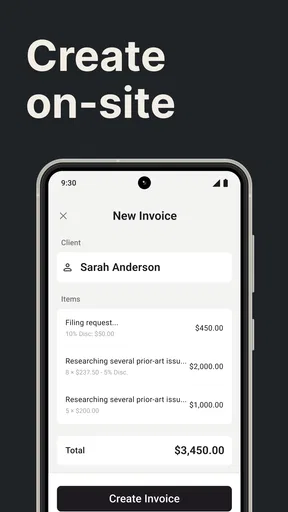
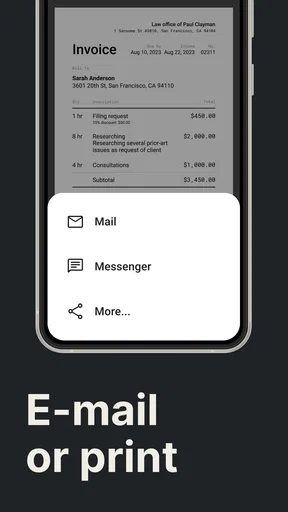
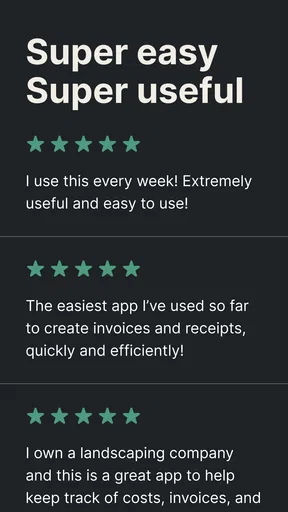
 Analysis by AppCompare
Hey there! So, I recently got my hands on this nifty app called Invoice Maker Tofu & Receipts, and let me tell you, it's been a game-changer for managing invoices on the go. Whether you're a freelancer, small business owner, or just someone who loves organizing their finances, this app might just be what you need. Let me break it down for you.
Who benefits most from a phone-first invoicing routine?
I’d look at Tofu first if your work produces a manageable stream of straightforward bills: a designer charging for a finished project, a tutor billing regular clients, or a home-service professional recording a small job between appointments. The value is less about replacing every part of a finance department and more about making the next invoice possible while the details are still fresh.
A realistic example is a freelance photographer finishing a small client session away from a desk. They can record the client and the service, include any relevant tax, and prepare a PDF without waiting until they get home. Saving repeat client details can also reduce retyping on the next job. I’d still check the final document carefully before sending it; quick entry is useful, but a wrong address, amount, or tax treatment is still the sender’s responsibility.
Tofu is a business app from GetPaid Inc. It is free to install, with in-app purchases ranging from $2.99 to $99.99 per item, so I’d distinguish the download price from any paid options before making it part of a long-term workflow. Its 4.4 average from around four thousand ratings and more than a million installs suggest that it has reached a substantial audience, though popularity alone doesn’t tell me whether a particular billing routine will fit.
What the phone workflow does—and what it cannot replace
Compared with drafting an invoice in a document editor, a dedicated maker can keep repeat client details and invoice-related tasks closer together. Compared with a spreadsheet, it offers a more direct route to producing a client-facing bill rather than asking you to maintain a template and calculate totals yourself. That convenience matters most when the same basic process comes up repeatedly.
The trade-off is that a mobile invoicing app should not automatically be treated as a full bookkeeping system. If you need formal accounting controls, extensive reconciliation, payroll, or a carefully managed record across several staff members, a dedicated accounting platform may be the safer home for that work. I’d use Tofu for creating and organizing everyday billing documents, then make sure the resulting records fit whatever accounting process the business already relies on.
One practical habit is to settle your item names and tax approach before sending a run of invoices. Consistent wording makes it easier for clients to recognize repeat services and for you to review your own records later. The app’s ability to add items and tax is useful, but it doesn’t remove the need to know which tax treatment applies to your business or customer.
Worth Reading Before You Choose

EA SPORTS FC Mobile 26 Is a Bigger Football Game, but It Takes Time

Flipboard Shows What News Apps Must Do Beyond the Feed

Switching to Android Auto Means Rethinking Your Driving Routine

Google Calendar Makes a Crowded Week Easier to Manage

Ludo King Makes the Most of the Minutes Between Plans

Baby Panda World Brings Quick Play to Modern Phones, but Its Game Library Feels Busy
Getting Started with Invoice Maker Tofu & Receipts
Jumping right into the app, the setup was super smooth. After a quick download and installation, I was ready to dive in. The interface is clean and pretty intuitive, so you don’t need to be a tech whiz to figure things out. Just a few taps, and I was creating invoices like a pro.
User Interface and Experience
The first thing that caught my eye was the sleek design. It’s simple yet effective, with everything you need at your fingertips. The dashboard gives you a great overview of all your invoices, clients, and payments. No clutter, no mess—just straightforward functionality. I especially loved how easy it was to customize invoices. You can add your logo, change colors, and tweak the layout to match your brand’s vibe.
Readability, navigation, and a closer look before sending
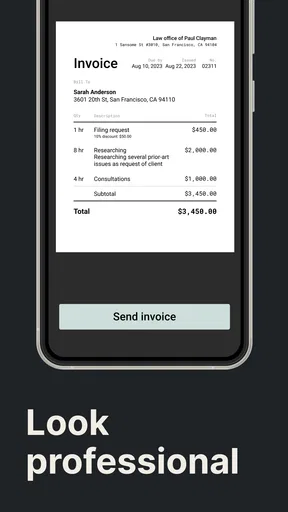
A clean dashboard helps when I need to get oriented quickly, but I would not judge an invoice’s readability only by how tidy the app screen looks. The customer reads the PDF, not the editor. After changing a logo, color, or layout, I’d check the finished document for contrast, legible item descriptions, and a clear total. A branded design is useful only if the amount due and payment details remain easy to find.
This is especially worth doing when a client reads invoices on a small phone screen or prints them in grayscale. Avoid relying on color alone to distinguish important information, and keep service names specific enough that the recipient can understand the charge without asking you to translate your shorthand. These are small checks, but they prevent a polished template from becoming harder to use than a plain one.
Creating Invoices
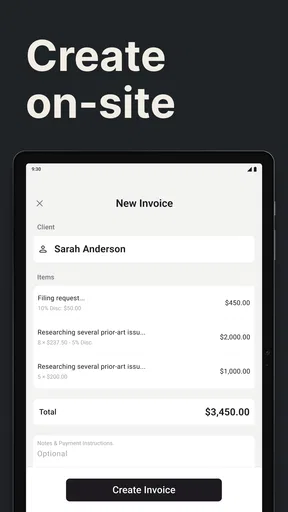
Creating invoices with Invoice Maker Tofu & Receipts is a breeze. You can add client details, itemize services or products, and even include taxes if needed. There’s also an option to save client information for future use, which saves a ton of time if you’re regularly invoicing the same folks.
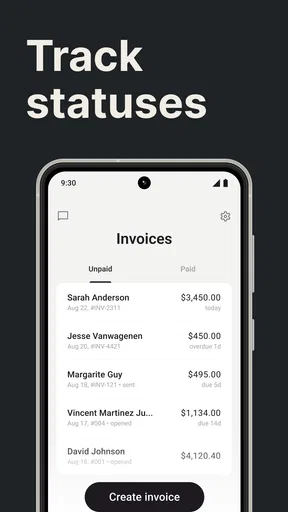
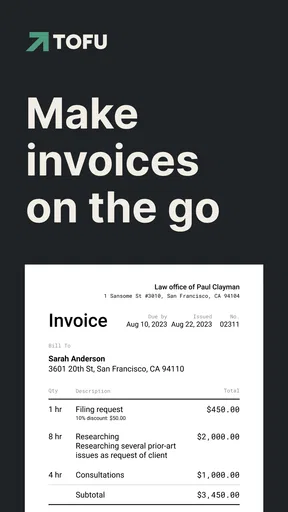
Another cool feature is the ability to generate PDF invoices that you can send directly from the app. It even lets you track when the invoice has been viewed, which is super handy for following up with those pesky late payments.
Getting more value from a repeat-client setup
For repeat work, I’d treat saved client details as a time-saver, not as a reason to skip a final review. A returning customer may have a new billing contact, address, or project description, so it is worth checking each field before generating the PDF. I’d also make descriptions concrete: “two-hour consultation” is easier to understand later than a vague label such as “services.”
The viewed status can help answer a narrow but useful question: has the client opened the invoice? It does not, by itself, tell me whether they agree with the bill, have scheduled payment, or received a reminder. I’d use it as context for a polite follow-up rather than treating a view as proof that a payment is imminent.
Managing Receipts
Aside from invoicing, the app also shines in managing receipts. You can snap a photo of your receipts, categorize them, and attach them to specific invoices or expenses. This makes keeping track of your business expenses way less of a headache. Plus, having everything in one place is a lifesaver come tax season.
A receipt routine that survives a busy day
Receipt capture is most useful when it happens close to the purchase. If I buy supplies between jobs, I’d photograph the receipt and assign a meaningful category before it disappears into a pocket or bag. Attaching it to the related expense or invoice can preserve the reason for the cost, which is more useful later than a camera roll full of unidentified slips.
There is a trade-off: a photo is only as useful as its legibility and filing. I’d check that the merchant, date, and total can be read in the image, then use a consistent category scheme rather than inventing a new label each time. For a business with many transactions or formal audit procedures, I would still follow its established record-retention rules instead of assuming a phone-based copy is sufficient on its own.
Motor, sensory, and situational access
Using a phone for short billing tasks can be convenient when I’m away from a desk, but it also makes precision important. Entering client names, amounts, and item details involves repeated taps and text entry. If hand movement, fatigue, or tremor makes that uncomfortable, I’d avoid rushing through an invoice in a crowded or moving setting; preparing it later in a calmer place may be the more reliable choice.
Sensory conditions matter too. Bright outdoor light, glare, noise, or a distracting worksite can make it harder to review a screen carefully. The practical adjustment is to separate capture from approval: note or photograph a receipt when needed, then review the important figures and the final PDF somewhere comfortable. That reduces the chance that a quick glance becomes the only quality check.
The app is rated for Everyone and supports Android devices running version 6.0 or later. It is also available on iOS, which may suit people who move between familiar devices, although I would not assume that the interface behaves identically on every screen. The current Android version is 1.2.13. If readability or navigation is a decisive need, I’d test the tasks that matter on the actual device before relying on it for daily work.
Reports, backup, and the limits of a compact setup
One feature I found particularly useful is the report generation. You can pull up reports on your earnings, expenses, and other financial metrics. This is great for getting an overview of your financial health and planning future budgets.
There’s also a built-in backup system, which ensures that all your data stays safe. With options to sync to the cloud, you never have to worry about losing important information.
I’d use reports as a quick view of activity, not as a substitute for checking the underlying entries before making a tax or cash-flow decision. A miscategorized receipt or an invoice that has not been updated can affect how useful a summary feels. Likewise, backup and cloud syncing are reassuring conveniences, but I’d still make sure I understand where the business keeps its authoritative records and who is responsible for reviewing them.
Support and Accessibility
The app offers solid support. There’s a helpful FAQ section and quick customer service for any hiccups along the way. It’s also available on both Android and iOS, which means you can use it no matter what device you’re rocking.
Moreover, it supports multiple currencies and languages, making it a versatile choice for international users. This is perfect if you’re dealing with clients from different parts of the world.
Multiple currencies and languages can make cross-border work less awkward, but they do not remove the need to confirm the currency and wording on each client’s document. I’d be especially careful when switching between customers in different markets: a saved client profile and a familiar template can encourage speed, while the wrong currency or language choice can make an otherwise accurate invoice confusing.
When I would choose something else
I would skip Tofu as my sole business system if I needed a shared, tightly controlled workflow where several people approve bills, reconcile transactions, or manage a large volume of records. A desktop accounting suite or a dedicated bookkeeping service is a better fit when the job extends beyond preparing invoices and keeping supporting receipts in order.
I’d also think twice if most billing happens in batches on a large screen, or if a customer requires a specific invoice format that I cannot comfortably reproduce. In those cases, the convenience of mobile creation may matter less than a desktop tool’s broader editing and review workflow. The sensible test is to create one representative invoice, inspect the PDF, and confirm it fits the client’s requirements before moving regular billing over.
For a solo operator who mainly needs clear invoices, occasional receipt capture, and a quick view of business activity, the balance is more appealing. The app’s business focus and mobile approach make it easier to keep routine paperwork close at hand without turning every small job into a trip back to a computer.
Final Thoughts on Invoice Maker Tofu & Receipts
Wrapping things up, Invoice Maker Tofu & Receipts is a stellar app for anyone who needs to manage invoices and receipts efficiently. It’s packed with features that are both practical and easy to use. I've enjoyed the seamless experience and how it’s streamlined my invoicing tasks.
Whether you’re just starting out or you’ve been in the game for a while, this app is definitely worth checking out. It’s user-friendly, reliable, and packed with everything you need to keep your finances in check. So, go ahead, give it a whirl, and see how it can simplify your billing process.
My inclusive verdict
My recommendation is strongest for independent workers who want a practical way to prepare routine invoices and keep receipt images associated with business activity. The straightforward presentation and phone-based workflow can reduce friction for ordinary tasks, while customization gives a small business room to make its documents recognizable. I would still review each output for clarity and accuracy instead of trusting speed alone.
For people whose comfort depends on larger screens, fewer repeated taps, or a particular assistive setup, I’d test the exact workflow before committing. A clean interface is a welcome start, not proof that every user or situation is covered. Tofu is best when its convenience matches the job: quick billing, organized supporting records, and a simple overview—not complex accounting or a substitute for careful financial checks.
Pros
- User-friendly interface for quick navigation.
- Customizable templates for personalized invoices.
- Supports multiple currencies for global use.
- Automatic tax calculations save time.
- Offline access ensures productivity anywhere.
Cons
- Limited integration with accounting software.
- Free version has watermark on invoices.
- No recurring invoice automation.
- Customer support is email-only.
- Lacks advanced reporting features.
FAQs for Invoice Maker Tofu & Receipts
What features does Invoice Maker Tofu & Receipts offer?
Invoice Maker Tofu & Receipts provides a comprehensive suite of features for creating professional invoices and receipts. Users can customize templates, add logos, and manage multiple clients. The app also supports various currencies and tax rates, making it ideal for freelancers and small businesses operating internationally.
Is Invoice Maker Tofu & Receipts easy to use for beginners?
Yes, Invoice Maker Tofu & Receipts is designed with user-friendliness in mind. Its intuitive interface allows beginners to easily navigate through the app. With step-by-step guides and helpful tips, users can quickly learn how to create and send invoices without prior experience.
Can I use Invoice Maker Tofu & Receipts offline?
The app offers offline functionality, allowing users to create and edit invoices without an internet connection. However, to send invoices via email or sync data across devices, an internet connection is required. This feature is particularly useful for users who frequently work in areas with unstable connectivity.
How secure is my data in Invoice Maker Tofu & Receipts?
Invoice Maker Tofu & Receipts prioritizes user data security by employing industry-standard encryption protocols. Data is securely stored and backed up, ensuring that sensitive client and financial information remains protected. Users can also enable additional security features such as passcodes or biometric authentication.
Does Invoice Maker Tofu & Receipts offer customer support?
Yes, the app provides robust customer support through multiple channels. Users can access a dedicated help center, submit queries via email, or use in-app chat support for immediate assistance. The support team is known for quick response times and helpful solutions to any issues or questions users may encounter.


